 Clouisle
Team Management
Establish a stable team collaboration structure in the order of creation, role assignment, member joining, and handoff handling.
Feature Overview
Team management is used to actually implement the organizational structure in the platform. Only when team boundaries are clear can resource ownership, permission assignment, cost statistics, and member handoff remain stable long-term.
Applicable Scenarios
This page is suitable for:
- Creating a team for the first time
- Adding members to a team
- Adjusting team roles
- Transferring ownership
- Handling resource handoff when members leave a team
Prerequisites
Before you start, we recommend preparing:
- A clear team name and purpose
- A confirmed Owner and team administrators
- A preliminary decision on which Agents, knowledge bases, or workflows will belong to this team
Operation Steps
Step 1: Enter the Team List and First Review the Existing Team Structure
After the administrator enters the Teams page in the Admin Console, first confirm which teams already exist on the platform.
This step focuses on:
- Whether team naming is clear
- Whether there are already too many teams
- Whether an existing organizational structure can be reused
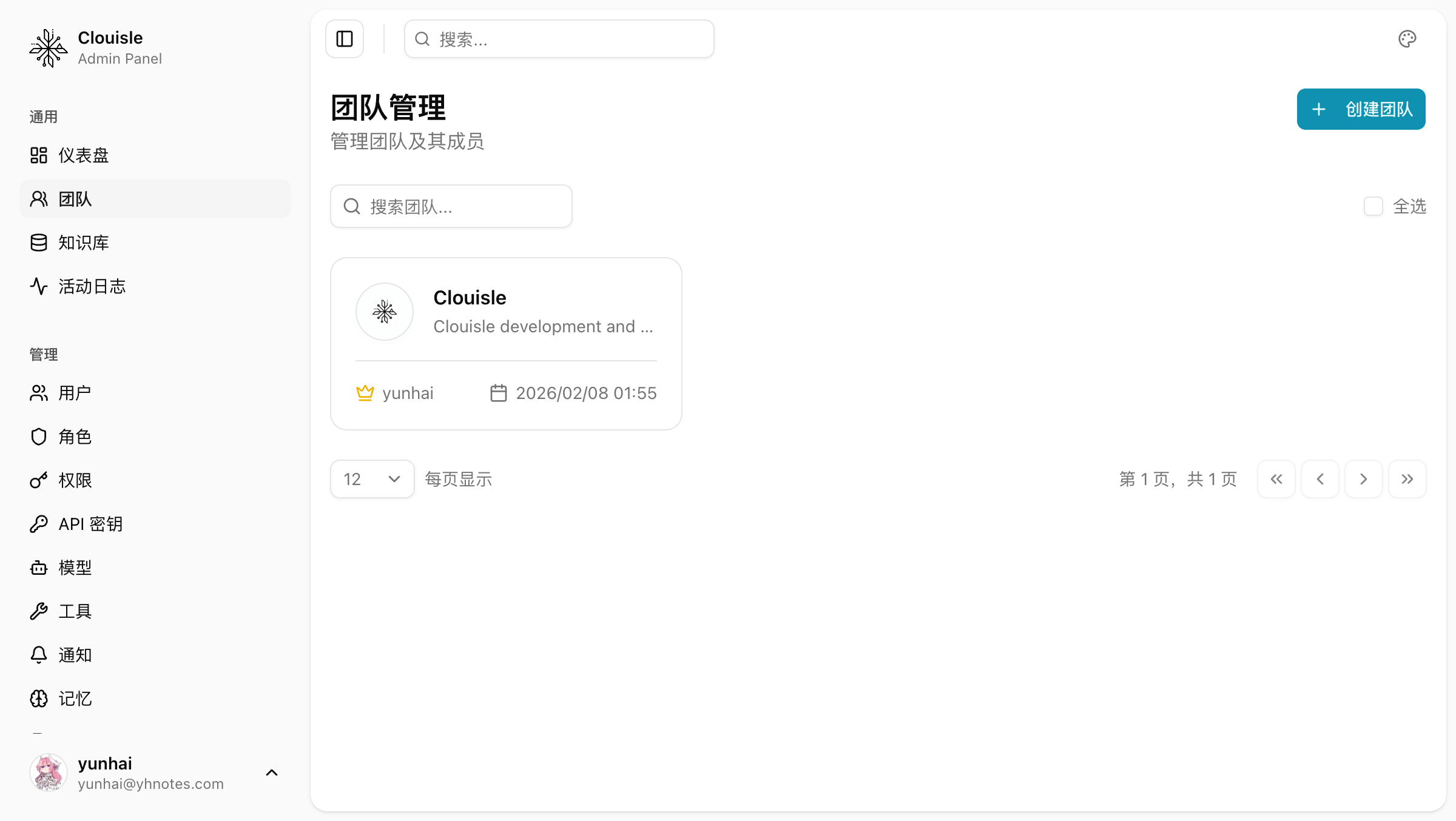
After completing this step, you should be able to determine whether the new team should be added as an independent unit or whether an existing team should continue to be used.
Step 2: Create the Team and Clarify Its Purpose
When creating a team, the name should directly reflect the organizational boundary, such as:
- Marketing Department
- East China Delivery Team
- Dedicated Team for a Specific Customer
- AI Team for a Specific Business Line
Do not use vague names such as "test team" or "temporary team". Otherwise, later resource ownership will become increasingly chaotic.
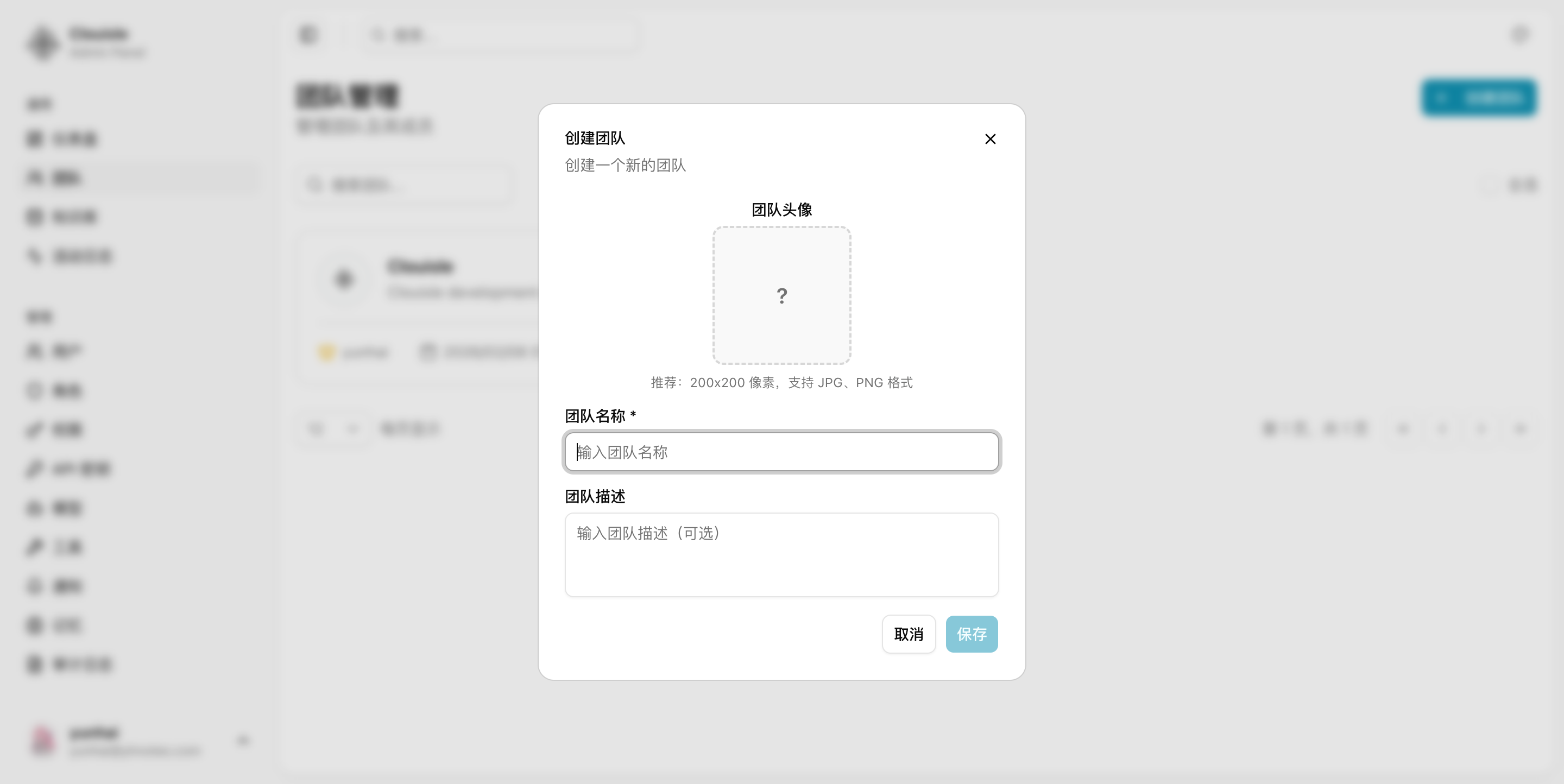
Step 3: Add Core Management Roles First
After the team is created, do not rush to add everyone. We recommend first adding:
- Owner
- Team administrators
Build the management framework first, then begin expanding members.
Step 4: Add Members in Batches and Validate Role Effects at the Same Time
When adding members, we recommend doing it in batches by responsibility. For example, add operations first, then implementation staff, and finally read-only viewers. Each time you add a batch, validate once:
- Whether they can see resources in this team
- Whether they can perform the operations their roles should have
- Whether permissions are too broad or resources are invisible
Step 5: Define Handoff and Exit Rules in Advance
Before the team stabilizes, clarify in advance:
- Who receives resources after members leave the team
- How Owner changes are approved
- Whether regular members are allowed to leave by themselves
The earlier this step is defined, the less likely problems will occur when members change later.
Result Validation
A normally managed team should at least satisfy:
- The team and member status can be clearly displayed in the team list
- Team administrators can manage members but cannot exceed authority into site-level configuration
- Newly created resources can be correctly assigned to the team
- After member roles are switched, actual permissions change accordingly
FAQ
Why Is Collaboration Still Chaotic After a Team Is Created
Usually, this is not a problem with the team feature itself, but because:
- Team naming and purpose are unclear
- Resources are not truly assigned to teams
- Member roles were not validated in time
Why Is It Not Recommended to Add All Members at the Beginning
Because if the default permission settings are not appropriate, adding members in bulk will amplify the problem. Adding in batches makes it easier to gradually correct roles and resource visibility.
Why Should Ownership Transfer Be Handled Carefully
The Owner usually holds the team's highest control authority. Without a clear handoff process, subsequent team management may become directly blocked.
Notes
- Team names and organizational boundaries should be as stable as possible. Do not frequently change top-level divisions
- Before removing members, first check whether there are still resources to hand off
- Long-term Owner absence directly affects team governance efficiency
Teams and Collaboration
Use team boundaries to organize people, resources, and responsibilities, helping Clouisle move from personal use to multi-person collaboration.
Team Model Authorization
Allocate model capabilities by team to balance capability access, cost control, and organizational governance.